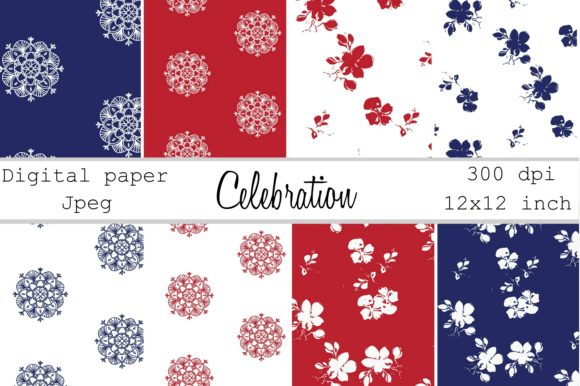
Celebration Red White and Blue Papers: Structuring Your Patriotic Design Workflow
When preparing for a themed campaign, seasonal product line, or branded content series, the quality of your foundational design assets directly impacts your execution speed and final output. The Celebration Red White and Blue Papers and digital paper design pack offers more than just visually appealing textures. It provides a structured starting point for professionals who need reliable, high-resolution materials for branding, planning, web design, sublimation, and print projects. This article examines how to integrate these digital papers into practical workflows, from pre-production planning through to final delivery and archiving.
Technical Foundation: Why Specs Matter in a Production Workflow
Before discussing creative applications, it is essential to understand the technical parameters of the assets. The pack includes eight digital papers in JPEG format, each measuring 12 x 12 inches at 300 DPI, resulting in 3600 x 3600 pixels. These specifications determine the range of viable use cases and the steps required to prepare files for different outputs.
Resolution and Scale: The 300 DPI Advantage
Three hundred dots per inch is the industry standard for high-quality print reproduction. At 12 x 12 inches, each paper contains 3,600 pixels per side. This resolution allows you to produce crisp, detailed prints for items such as planner covers, greeting cards, gift wrap, and small posters. If your output is digital, you can downscale the files to 72 or 96 DPI for web use without losing visual fidelity. Understanding this conversion step is critical for maintaining consistency across print and digital channels. When working with sublimation transfers, the 300 DPI source ensures that fine details in the hand-painted flowers and mandala silhouettes transfer cleanly onto substrates like polyester fabric or coated ceramics.
File Format and Compatibility: JPEG Workflow Best Practices
JPEG files offer broad compatibility across design software, office suites, and online platforms. They balance color depth with manageable file sizes, making them suitable for rapid iteration and sharing. When using these papers in collaborative environments, avoid repeatedly saving high-compression JPEGs to prevent generation loss. Instead, maintain the original downloaded files as your master archive and export compressed copies only for specific deliverables. This practice preserves the integrity of the red, white, and blue color palette and the delicate hand-painted details across multiple projects.
Integrating Papers into a Structured Project Lifecycle
The most effective use of thematic design assets occurs when they are deliberately placed within a broader project workflow. Below are strategies for incorporating the Celebration Red White and Blue Papers during each phase of a creative or business project.
Phase 1: Pre-Production and Mood Curation
Before you begin designing, use the papers as a reference for color palette validation and thematic direction. The pack features hand-painted floral elements and mandala silhouettes in red, white, and blue. If you are planning an Independence Day campaign, a patriotic product launch, or a summer celebration event, these papers instantly establish a cohesive visual tone.
- Client presentations: Insert the papers into mood boards or style tiles to communicate the intended aesthetic without requiring additional design work.
- Tool compatibility: Upload the JPEGs directly into platforms like Canva, Adobe Express, or Milanote. Use them as backdrop layers to test how other brand elements, such as logos or typography, interact with the theme.
- Decision efficiency: By starting with a curated set of eight coordinating papers, you reduce the time spent searching for complementary textures. This streamlines the early decision-making process and keeps the project on schedule.
Phase 2: Active Design Execution
During the production phase, the papers serve multiple functional roles depending on your output medium.
Branding and Packaging
For small business owners creating product packaging or hang tags, the 12 x 12 inch size accommodates standard box faces and tag layouts. Use the mandala silhouettes as a background element behind product information. The high contrast of white silhouettes on red or blue backgrounds improves readability while maintaining decorative appeal. If you use a sublimation printer, mirror the paper horizontally in your design software and print directly onto sublimation paper for transfer to hard goods like coasters, mugs, or tumblers.
Digital and Physical Planning
Productivity users and planning enthusiasts can incorporate the papers as inserts, dividers, or covers. Scale the 12 x 12 inch files to fit common planner sizes such as A5 (5.8 x 8.3 inches), Letter (8.5 x 11 inches), or Classic Happy Planner (7 x 9.25 inches). For digital planning platforms like GoodNotes or Notability, import the JPEG directly as a background or page template. The 3600 x 3600 pixel resolution provides ample cropping flexibility without losing sharpness on tablet screens.
Web Design and Social Content
When designing for web, convert the papers to sRGB color space and reduce resolution to 72 DPI. The floral and mandala patterns work effectively as hero section backgrounds, email newsletter headers, or social media post templates. Layer semi-transparent overlays using your brand color to maintain readability of text placed directly on the patterns. This technique preserves the hand-painted texture while ensuring accessibility standards for contrast.
Phase 3: Post-Production, Quality Control, and Archiving
After completing your designs, verify color accuracy before sending to print. Monitor calibration is critical when working with red and blue hues, as these colors can shift significantly between screens and print outputs. Request a physical proof from your printer if producing branded materials. For digital assets, check how the backgrounds appear on different devices.
Archive the original files systematically. Organize them by project name or theme in cloud storage or a local server. Use clear naming conventions, such as Celebration_RWB_Mandala_01.jpg, to facilitate future searches. By archiving the master files alongside your completed projects, you ensure that the same thematic foundation can be reused or adapted for upcoming campaigns without recreating work.
Platform-Specific Implementation Strategies
Different design environments require distinct approaches to asset integration. Below are practical methods for using the Celebration Red White and Blue Papers across common software platforms.
Canva for Rapid Content Creation
Canva users can upload the JPEGs directly to their brand kit or project folders. Because the papers are 12 x 12 inches, they fit standard square formats for Instagram posts, story backgrounds, and product thumbnails. To create a layered effect, place one paper as the base layer and add a second paper with reduced opacity. Use the white mandala silhouettes as natural framing devices for text blocks or call-to-action buttons. If you produce recurring content, save a template that references these papers so team members can generate consistent on-brand graphics quickly.
Adobe Suite for Advanced Compositing
In Photoshop or Illustrator, the high resolution of 3600 pixels per side gives you room to extract specific elements. Use the Magic Wand or Pen tool to isolate the hand-painted flowers from the background, creating custom PNG assets for further compositing. The mandala silhouettes work well as clipping masks or overlay patterns. For print production, ensure that your document color mode is set to CMYK if you are outputting to commercial offset or digital press. The conversion from RGB to CMYK may alter the vibrancy of the red tones, so layer adjustments or soft-proofing is advised.
Microsoft Office for Professional Documents
Newsletters, brochures, and internal communications benefit from branded backgrounds. In Publisher, Word, or PowerPoint, insert the JPEG as a page background or watermark. Because the papers are 12 x 12 inches, they tile cleanly on standard letter-sized pages when scaled appropriately. Reduce the opacity to around 20 percent to keep text legible while adding a professional, thematic touch to your documents.
Organizing Assets for Maximum Efficiency
A well-structured asset library saves time and reduces friction during the creative process. Implement a folder system that groups the Celebration Red White and Blue Papers by theme and technical specifications. For example:
- Master Assets > Digital Papers > Patriotic Collection (contains the original 300 DPI JPEGs)
- Working Files > Campaigns > July Promotion (contains project files that link back to the master assets)
If you work in a team, establish a naming convention that includes the theme, pattern type, and primary color. Consistent naming enables all team members to locate the correct background quickly without opening multiple files. This organizational discipline directly reduces project lead time and minimizes the risk of using outdated or low-resolution versions.
The Entrepreneurial Advantage of High-Quality Thematic Packs
For entrepreneurs, freelancers, and small business owners, time is a direct cost. Purchasing a pre-designed, cohesive pack like Celebration Red White and Blue Papers eliminates the need to source multiple textures that may not coordinate well together. The hand-painted flowers and mandala silhouettes provide a polished, custom look without the hours required to create original illustrated elements from scratch. This efficiency allows you to redirect creative energy toward strategy, messaging, and client relationships.
Additionally, the reusable nature of digital assets improves long-term return on investment. The same pack can serve a Memorial Day launch in May, an Independence Day campaign in July, and a Labor Day promotion in September. By adapting the same base assets with different overlays, typography, or product shots, you maintain brand consistency across your seasonal marketing calendar while minimizing per-project design costs.
Integrating themed digital papers into a structured workflow transforms them from mere decorative files into functional components of a professional production system. By understanding the technical specifications, applying them intentionally across project phases, and organizing them for ongoing reuse, you maximize both the creative potential and the practical value of the Celebration Red White and Blue Papers for branding, planning, web design, sublimation, and all your printable projects.