Fern Leaf Clipart Watercolor for Elegant DIY Projects
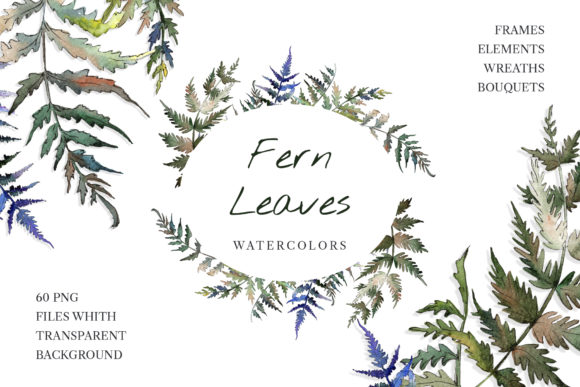
If you have ever hunted for botanical design assets that feel alive rather than stiff, you already know the struggle. Many clipart packs look flat, generic, or overly digital. Fern Leaf Clipart Watercolor solves that problem with hand-painted aquarelle illustrations that bring real warmth and organic beauty to your work. These are not harsh vector shapes with perfect edges. Every leaf, frond, and stem carries the soft bleed and gentle variation that only watercolor can deliver.
The pack includes 60 separate PNG files at 300 dpi with transparent backgrounds, plus JPG patterns and frames sized at 3500x3500 pixels. That means you can drop these elements into almost any project without fighting awkward white boxes or low-resolution artifacts. The set covers frames, borders, patterns, and isolated fern illustrations, all highly detailed and ready for immediate use in print or digital work.
What Makes This Clipart Pack Different
Most botanical clipart falls into two camps. On one side you have hyper-realistic photographs that are difficult to layer and style. On the other you have simplified icons that lack personality. Fern Leaf Clipart Watercolor sits in a sweet spot between those extremes. The illustrations are detailed enough to feel authentic, yet loose enough to blend naturally into backgrounds, textures, and layered compositions.
The hand-painted quality matters more than most people realize. When you place one of these ferns behind text or inside a frame, the subtle color gradients and irregular edges create depth. Your eye reads the image as art, not as a mass-produced stamp. This distinction becomes critical when you are designing wedding invitations, greeting cards, or any project where emotional tone matters as much as information.
Because each image is a separate file, you can mix, scale, rotate, and combine elements without losing quality. Need a border for a quote graphic? Layer a frame PNG over a patterned JPG background, then drop an isolated fern clipart into the corner. The transparent PNGs stack cleanly in Photoshop, Canva, Affinity, or any layer-based editor.
Where Fern Leaf Clipart Watercolor Shines in Real Projects
Let me walk through some practical applications based on what I have seen designers and small business owners do with this type of botanical asset.
Wedding and Event Stationery
Botanical wedding invitations have been popular for years, but the trend keeps evolving. Couples today want something that feels personal and handcrafted, not pulled from a generic template. Fern Leaf Clipart Watercolor gives you enough variety to create cohesive suites without repeating the exact same leaf shape across every piece. Use a border design for the invitation, a pattern for the RSVP card, and an isolated fern motif for the envelope liner or welcome sign.
The watercolor style pairs naturally with soft color palettes - sage green, dusty blue, blush pink, or warm cream. Because the PNG files have no background, you can place them over textured paper photos, marble textures, or flat color blocks without ugly white edges showing.
Greeting Cards and Stationery
For greeting card designers, variety is everything. A set with 60 files means you can create multiple card designs from a single purchase. Use the frames as card fronts with a short sentiment inside. Use patterns as all-over background prints for folded cards. Use isolated fern elements to build wreaths, clusters, or minimalist corner accents.
The 300 dpi resolution ensures crisp printing whether you are using a home inkjet, a local print shop, or a professional press. JPG patterns at 3500x3500 pixels give you plenty of surface area for card backs, interior panels, or envelope liners.
Social Media Graphics and Digital Content
Bloggers, content creators, and social media managers often need quick visual assets that look polished without hours of custom illustration work. Fern Leaf Clipart Watercolor works beautifully as background art for quote graphics, blog post headers, Pinterest pins, or Instagram carousels. Layer a semi-transparent pattern behind bold typography, or use an isolated fern as a subtle watermark or brand element.
Because the files are PNG with transparency, you can adjust colors and sizes freely. Want a muted sepia tone for a vintage quote? Desaturate the green slightly in your editing software. Need a bright emerald pop for a spring promotion? Increase saturation or apply a color overlay. The flexibility is baked into the file format.
Posters, Prints, and Wall Art
Printable wall art remains a strong category for Etsy sellers and independent artists. Fern clipart with watercolor texture holds up well at larger sizes because the natural brush variation reads as intentional artistry, not pixelation. Combine multiple fern elements into a gallery wall set, or use the border designs to frame inspirational quotes and poetry.
For bloggers and publishers, these same assets work as chapter headers, section dividers, or decorative page elements in digital guides, planners, or recipe books.
How to Choose and Use Fern Leaf Clipart Watercolor Effectively
When you open a pack with 60 files, the biggest challenge is not finding something useful - it is narrowing down your choices for a specific project. Here is practical guidance based on how design assets perform in different contexts.
Readability and Visual Hierarchy
Watercolor elements are visually rich by nature. That is their strength, but it can also create problems if you place them carelessly. When using a fern pattern or border behind text, pay attention to contrast. Light, airy watercolor washes work well behind dark typography. Dense, heavily pigmented illustrations may compete with text and reduce readability.
If you are designing a wedding invitation, use the pattern or frame files as decorative containers, then keep the text area simple and uncluttered. The fern should frame the message, not fight it. For social media graphics, consider using isolated fern elements as small accent pieces rather than full backgrounds, especially when text is the main focus.
Font Pairing and Typography
Botanical watercolor has an organic, slightly romantic personality. It pairs well with serif fonts, elegant script fonts, and clean sans serif fonts that provide contrast without competing. A delicate handwritten font can echo the hand-painted quality of the ferns. A modern sans serif creates a nice tension between natural and contemporary.
For wedding projects, try pairing Fern Leaf Clipart Watercolor with a classic serif like a modern Garamond or a refined script. For branding or blog graphics, a clean sans serif with generous spacing keeps the overall look professional and breathable.
Licensing and Commercial Use
Before you start selling products built around these illustrations, check the specific license terms that came with your purchase. Most high-quality clipart packs allow commercial use in finished products like invitations, cards, and prints. However, terms can vary regarding resale of digital assets, redistribution, or use in logo designs. Understanding your license upfront prevents headaches later.
When in doubt, use the assets as part of a larger design rather than as standalone resold elements. Combining border, pattern, and isolated files into a unique composition clearly counts as transformative use.
Practical Workflow Tips for Designers and Creatives
If you are new to working with watercolor PNG assets, a few workflow habits will save you time and frustration.
First, organize your files before you start designing. The 60 files in this pack include frames, borders, patterns, and isolated elements. Create folders or tags for each type so you can find what you need quickly. When you are in the middle of a client deadline, digging through numbered PNGs slows you down.
Second, test your color adjustments early. Watercolor elements have subtle tonal variation built in. Desaturating or recoloring them works well, but extreme hue shifts can produce muddy or unnatural results. Make a test file with a few different color treatments before committing to a full design.
Third, use the JPG pattern files as base textures. The 3500x3500 pixel resolution means you can tile, crop, or scale patterns without losing clarity. Drop a pattern onto a layer set to Multiply or Soft Light over a solid color background, and you get an instant custom texture that looks like hand-painted paper.
Fourth, combine multiple isolated fern elements to build your own wreaths, bouquets, or corner clusters. Because each image is separate and transparent, you can overlap and rotate fronds until you get a composition that feels balanced and natural. This custom approach gives your work a unique look even when using a pre-made clipart pack.
Why This Pack Works for Both Print and Digital
The dual format of this set - PNG files for isolated elements and transparent layering, plus JPG files for seamless patterns and frames - makes it genuinely versatile. For print projects like posters, cards, and invitations, the 300 dpi resolution ensures sharp, professional output. For digital use like social media graphics, blog headers, and web elements, the transparent backgrounds simplify workflow and reduce file size issues.
The 3500x3500 pixel JPG files are large enough to cover most print sizes without stretching. A pattern at that resolution can be printed at roughly 11.5 inches square at 300 dpi, which covers most card and invitation dimensions comfortably. For larger prints, you can tile the pattern or scale it slightly with minimal quality loss.
From a brand identity perspective, botanical watercolor elements convey an approachable, refined personality. They suggest attention to detail without feeling stiff or corporate. For small business owners looking to build a consistent visual language across packaging, social media, and print materials, a well-curated set of fern illustrations provides a cohesive thread that customers will recognize.
Whether you are designing a single greeting card or building a full brand identity around botanical themes, Fern Leaf Clipart Watercolor gives you the depth and flexibility to create work that feels both polished and personal. The hand-painted quality, the variety of formats, and the practical file specifications all support real-world creative work without adding unnecessary complexity.