Jango Magnolia Watercolor Set: A Practical Toolkit for Creative Professionals and Small Business Owners
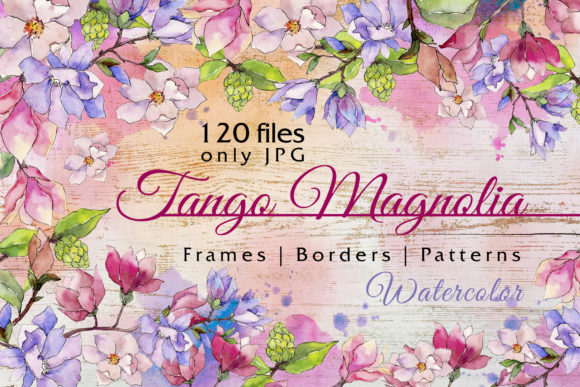
When you work with visual content regularly, you quickly learn that not all design assets are created equal. Some require extensive editing before they become usable. Others come with licensing restrictions that limit how and where you can deploy them. The Jango Magnolia Watercolor Set sits in a different category. It is a collection of 120 hand-painted aquarelle files designed to move directly from download to production with minimal friction. Whether you are preparing wedding invitations, building a blog post, or assembling a brand presentation, this set offers a workflow that prioritizes speed, flexibility, and visual consistency.
What the Jango Magnolia Watercolor Set Contains and Why It Matters
Let us begin with the structure of the set itself. You receive 120 files in total, divided into three categories: isolated elements, frames, and patterns. Every illustration is a separate JPG file at 300 dpi with no background. The patterns measure 3500x3500 pixels, which gives you room to scale, crop, and reposition without losing detail. All elements are painted by hand, which means the textures, brush strokes, and color transitions carry the organic feel of real watercolor rather than the flat uniformity of digital brushes.
For someone who works with wedding stationery or greeting card design, the isolated elements are often the most immediately useful. You can place a single magnolia bloom onto a saved layout, adjust its size, and have a finished composition in under a minute. The frames work well for borders around text or as decorative enclosures for quotes and invitations. The patterns function as background textures or repeating motifs for packaging, social media tiles, or website headers.
The absence of a background is a deliberate design choice. You do not need to spend time masking or extracting subjects. The elements drop directly into your project layer. If you work in Photoshop, Canva, Affinity, Procreate, or even a presentation tool like PowerPoint, the process remains the same: place the file, position it, and move on.
Where This Set Fits Into a Real Creative Workflow
Understanding where a resource belongs in your process matters more than knowing what it contains. The Jango Magnolia Watercolor Set works across three distinct phases of a project: preparation, production, and finishing.
Preparation Phase: Building a Library of Ready-to-Use Assets
Before you begin a project, you typically gather materials. If you design wedding invitations, you might collect floral motifs, border options, and background textures. This set covers all three categories in one download. By unpacking the files into a clearly labeled folder structure, you reduce the time spent searching for assets mid-project. Because all images share a consistent hand-painted style, you avoid the mismatch that occurs when you mix assets from different sources.
One practical step here is to open the patterns file first and review which textures align with your current color palette. Magnolia flowers, with their soft whites, creams, and pale greens, pair well with pastel backgrounds, gold foil accents, and muted earth tones. If you are working on a spring collection or a botanical-themed product line, these patterns can form the visual foundation for the entire project.
Production Phase: Assembling Compositions Efficiently
During production, speed matters. The JPG format without background allows you to drag and drop elements directly into your canvas. There is no need to convert, group, or remove a white background. The 300 dpi resolution ensures that prints remain sharp, and the 3500x3500 pixel pattern size gives you enough data for large-format applications like posters or signage.
When you place an isolated magnolia element, you can scale it up or down without noticeable quality loss within reasonable limits. If you need a specific color, you can overlay a hue adjustment layer or use blending modes to tint the watercolor. The organic nature of hand-painted textures responds well to color shifts because the underlying brush strokes remain visible even after the adjustment. This makes the set suitable for brand work where you need to match a specific hex code or Pantone reference.
For frame elements, consider layering them over patterned backgrounds. A magnolia frame placed on top of a soft cream pattern creates depth without requiring additional design work. The combination already looks like a finished piece. If you are assembling a collection of quote cards, you can produce a consistent series by rotating between frames and isolated elements across different cards.
Finishing Phase: Quality Control and Export Consistency
At the end of a project, you need every file to meet the same technical standards. Because all elements in this set share the same resolution and format, you avoid the situation where one invitation card uses a 72 dpi asset and another uses a 300 dpi asset. The uniformity simplifies export. You can build a template, insert the magnolia elements, and export the entire batch knowing that every file will print or display at the same quality.
For print projects, test a single pattern file at full size before committing to a large run. Hand-painted textures sometimes shift slightly between monitors and print, so a quick proof helps you confirm that the color and detail translate correctly. The 300 dpi specification is the industry standard for commercial printing, so you do not need to upsample or interpolate.
Practical Use Cases Across Different Roles
Different professionals will find different entry points into this set. Let us walk through a few scenarios to illustrate how the files integrate into actual work.
Wedding and Event Stationery Designers
You produce save-the-dates, invitations, ceremony programs, and thank-you cards. The frames work well as border designs for invitation text. The isolated magnolia blooms can serve as corner accents or centerpiece graphics. The patterns can be used as envelope liners or as background textures for your website gallery. Because the set contains 120 files, you can design an entire wedding suite without repeating a single element. This matters when clients want a cohesive look across multiple items but dislike seeing the exact same flower repeated.
Greeting Card and Stationery Creators
Greeting cards require variety. A single card design often needs a front image, an inside border, and a back cover element. With this set, you can pull an isolated magnolia for the front cover, use a frame for the inside message area, and apply a subtle pattern to the back. The hand-painted style gives cards a premium look without requiring you to commission original artwork for every design.
Bloggers and Content Creators
Blog posts need featured images, dividers, and background textures. The pattern files at 3500x3500 pixels offer enough resolution to cover a full-width blog banner. The isolated elements work well as bullet point icons or as visual breaks between sections. If you run a lifestyle blog with a botanical or minimalist aesthetic, these assets help maintain visual consistency across posts without requiring a design degree.
Small Business Owners and Marketers
Product packaging, social media graphics, and promotional materials benefit from cohesive visual branding. The magnolia theme works well for brands in wellness, beauty, home decor, or event planning. You can use the patterns as Instagram story backgrounds, the frames as quote card borders, and the isolated elements as product detail callouts. Because the set is ready to use, you can produce a week of social media content in one sitting.
Organization and Long-Term Use
To get the most value from this set over time, organize the files before you need them. Create three folders inside your main asset library: Isolated, Frames, and Patterns. Inside each folder, rename files with descriptive titles such as magnolia_bloom_001, frame_floral_002, or pattern_cream_003. This simple step saves minutes later when you are searching for a specific element during a tight deadline.
The files work well in a template-based workflow. If you produce the same type of project repeatedly, such as monthly quote cards or seasonal invitations, build a master file with placeholder layers. When you begin a new project, open the master file and drop in fresh magnolia elements from the set. This approach reduces setup time and keeps your output consistent.
Because the elements are hand-painted, they age gracefully. Unlike trendy vector illustrations that feel dated after a season, watercolor textures carry a timeless quality. You can use these files for years without them looking stale. The botanical subject matter also spans seasons, making the set useful for spring, summer, and even autumn projects when paired with appropriate color adjustments.
Compatibility and Technical Considerations
The JPG format with 300 dpi and no background is compatible with virtually every design and layout application available today. Adobe Photoshop, Illustrator, InDesign, Affinity Photo, Canva, Procreate, Clip Studio Paint, and even simpler tools like Publisher or Pages can open and place these files. Because the background is removed, you do not need to worry about white boxes appearing around your elements when you layer them over colored canvases.
If you need to convert files to PNG for web use, the 300 dpi source provides enough detail to produce high-quality exports. The pattern files at 3500x3500 pixels are especially useful for website backgrounds because they tile cleanly at full screen width. For print, the resolution supports sizes up to roughly 11x11 inches at 300 dpi without interpolation. If you need larger dimensions, you can scale up with minimal blurring thanks to the organic texture of the watercolor.
Adjusting Colors and Scaling Elements
One of the more practical features of hand-painted watercolor assets is how they respond to color adjustments. Because the brush strokes contain subtle variations in density and transparency, applying a hue or saturation adjustment layer preserves the natural look. You can shift a white magnolia bloom to a soft blush, pale lavender, or warm cream without it looking artificial. This flexibility allows you to reuse the same element across different brand palettes or seasonal campaigns.
When scaling elements, keep in mind that reducing size does not affect quality, while increasing size beyond 150 percent may soften the detail slightly. For most digital and small-format print uses, this is not noticeable. For large posters or banners, use the pattern files at their native size to maintain crispness.
Final Observations on Process and Integration
The Jango Magnolia Watercolor Set is not the kind of asset that sits in a folder unused. It is designed for active, repeated use across multiple project types. The structure of the set, with its three categories and 120 individual files, encourages experimentation. You can combine a frame with a pattern, overlay an isolated bloom, and have a finished composition that looks custom. Over time, you develop a mental library of which elements pair well together, which speeds up every subsequent project.
For creative professionals and small business owners who value both quality and efficiency, this set reduces the gap between concept and completion. You spend less time sourcing and preparing assets and more time designing, assembling, and delivering the final product. The hand-painted detail ensures that your work stands out from templates and stock imagery, while the technical specifications guarantee that it holds up in production. If your workflow involves botanical themes, wedding stationery, greeting cards, or content creation, this set earns its place in your asset library from the very first project.