Old School Hot Rod Flame Elements Set: Bringing Classic Heat to Modern Design Projects
There’s something timeless about a well-drawn flame. Whether you’re building a brand identity for a custom garage, designing merch for a car show, or creating digital assets for a retro-themed campaign, flame graphics carry a specific energy that’s hard to replicate with any other motif. The Old School Hot Rod Flame Elements Set taps directly into that tradition, offering a complete toolkit for anyone who needs bold, classic flame designs without starting from scratch.
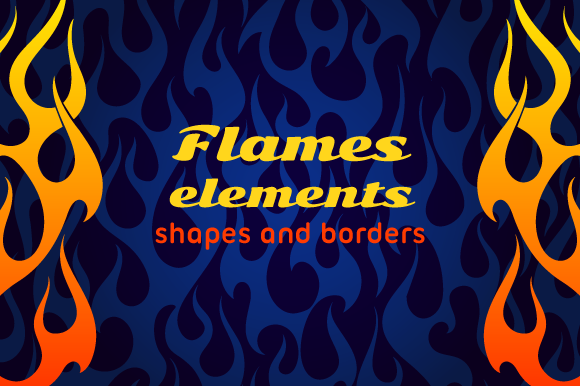
This package includes 24 distinct elements, two of which are designed as endless borders, plus a seamless pattern. You get vector files in .ai10 and .eps10 formats, along with multiple high-resolution JPG options. There are five color variations for the patterns, a black-and-white composite of all elements at once, and two red-and-yellow gradient composites—one on a white background and one on a dark background. In short, it’s built to give you flexibility whether you’re working in print, on screen, or across both.
What the Set Actually Contains and Why That Matters
Let’s start with the practical breakdown. The 24 elements include individual flame shapes, swoops, tips, and border components that you can mix, match, scale, and layer. The two endless borders are especially useful if you’ve ever tried to tile a flame pattern manually and ended up with awkward gaps or misaligned repeats. They’re designed to loop seamlessly, which saves time when you’re wrapping text columns, framing a flyer, or adding a hot-rod accent to a website header.
The seamless pattern works the same way—drop it into a background layer and it repeats without visible seams. This is the kind of feature that matters when you’re working on large-format prints, fabric designs, or digital backgrounds where consistency is key.
The vector files (AI10 and EPS10) are compatible with most major design software, including older versions of Adobe Illustrator and many free alternatives. If you’ve ever downloaded a vector set only to find it won’t open in your current software, you’ll appreciate the backward compatibility here. The JPGs at 2084x2084 pixels give you solid resolution for web use, social media graphics, or small print runs, while the 11400x7700 pixel composites are ideal for large banners, posters, or vehicle wraps.
Where Creators and Designers Get the Most Value
If you’re a freelance graphic designer or a small studio owner, you’ve probably had a client request something “vintage hot rod” or “retro automotive” at some point. Instead of drawing flames from scratch or digging through generic clip art, this set gives you a library of professional-grade elements that you can customize. You can recolor them, skew them, combine them with typography, or use them as masks for photos. Because the files are vectors, you can scale a single flame element to fit a business card or a billboard without losing quality.
For example, say a local auto shop wants a logo that feels authentic and mechanical. You could pull one of the flame borders, pair it with a bold sans-serif font, and build a mark that looks like it belongs on a vintage oil can. Or maybe a brewery wants a limited-edition label for a spicy IPA—those red-and-yellow gradients are already close to a fire-inspired palette, and with minor tweaks you can match the client’s brand colors.
Print Applications That Stand Out
Print is where flame graphics really shine, because the physical format highlights the curves and gradients in a way that screens sometimes flatten. With the five color options included in the set, you can produce flyers, posters, stickers, or apparel designs without spending hours on color matching. The 300 DPI resolution on all JPGs means your prints will stay crisp even at larger sizes.
Consider a scenario where you’re designing a series of T-shirts for a local car club. You could use the seamless pattern for a subtle all-over print on dark shirts, then use individual flame elements for a chest logo on lighter colors. The gradient composites work particularly well on dark backgrounds, where the red and yellow pop against black or navy. That’s a practical advantage—you don’t have to rebuild the color separation from scratch.
Real-World Uses Beyond the Obvious
It’s easy to think of flame graphics as exclusively automotive, but this set works in a surprising range of contexts. Event promoters, for instance, can use flame borders on concert posters for rock, metal, or punk shows. The aesthetic signals energy, rebellion, and loudness—qualities that match certain music genres. A poster for a summer music festival with a retro theme could combine the flame pattern with vintage fonts and get a cohesive look in minutes.
For educators and workshop leaders, the set can serve as a teaching tool. If you run design classes or online tutorials, showing students how to use vector flames in a layout is a hands-on way to teach layering, masking, and color theory. The black-and-white composite is especially useful here—students can see all 24 elements clearly and practice recoloring or rearranging them without the distraction of gradients.
Small business owners outside the automotive world can also benefit. A food truck that sells spicy chicken sandwiches could use flame elements on its menu boards and social media posts. A firewood delivery service might incorporate them into their branding. The key is that the flames don’t have to imply speed or cars—they can simply communicate heat, spice, or intensity.
Digital Content and Social Media
Bloggers and content creators who cover automotive culture, DIY projects, or retro design can use these elements to strengthen their visual identity. A YouTube channel about car restoration could use the flame border as a recurring intro graphic. An Instagram account focused on classic cars might use individual flame elements as story stickers or highlight covers. Because the set includes multiple formats, you can easily export small JPGs for quick social posts or vector files for more polished branding.
The seamless pattern is also valuable for website backgrounds. If you’re building a landing page for a hot rod event or a vintage parts store, a subtle flame pattern behind the hero section creates atmosphere without overwhelming the content. You can adjust the opacity in your design software to make it as bold or as faint as needed.
What to Consider Before You Start Using the Set
This set gives you a lot of creative freedom, but a few practical considerations will help you get the most out of it. First, while the vector files are compatible with Adobe Illustrator and many alternatives, if you’re working in a strictly raster-based tool like Photoshop, the JPG composites and individual elements will still serve you well. Just keep in mind that the individual JPG elements are not cut out with transparent backgrounds in every file—you’ll see the white background on some of the standard JPGs. The composite files with the gradient on a dark background do include that dark backdrop as part of the image, so plan your layering accordingly.
If you plan to use the flames for commercial merchandise—like T-shirts, stickers, or products you sell—check the license terms provided with your download. Most sets of this kind are royalty-free for commercial use, but it’s always good practice to confirm, especially if you’re working with a distributor or print-on-demand service.
Another thing to think about is color consistency. The five color options for patterns give you a starting point, but if your brand uses specific Pantone or HEX values, you may need to adjust the hues in your vector software. That’s straightforward with the AI and EPS files, but it’s worth noting if you were hoping for exact match out of the box.
Scale and Placement Tips
Because flames are organic shapes, they work best when they have room to flow. Avoid cramming too many elements into a small space—pick one or two focal flames and let the borders or patterns handle the background. The endless borders are particularly effective when used horizontally along the top or bottom of a flyer, or vertically along the edge of a poster. If you’re using the seamless pattern as a background, test it at different opacity levels to make sure text remains readable.
The gradient composites at 11400x7700 pixels are big enough for trade show banners or vehicle decals. For car graphics, the red-and-yellow gradient on dark background is a natural choice—it reads clearly from a distance and holds up well in outdoor lighting. Just make sure your print provider can handle the file size and color space correctly.
Who Benefits Most from This Set
This collection is especially useful for anyone who works on tight deadlines. If you’re a freelance designer juggling multiple projects, having 24 pre-drawn elements that you can drop into a layout saves hours of drawing and refining. The same applies to small business owners who handle their own marketing—you don’t need to be a professional illustrator to produce graphics that look polished and intentional.
For hobbyists, the set lowers the barrier to creating custom gear. Whether you’re making a one-off T-shirt for a car meet, designing decals for your own vehicle, or creating invites for a themed party, you get professional results without spending days learning vector drawing techniques.
Marketers and event organizers can also use these elements to unify a campaign. If you’re promoting a classic car auction, a motorcycle rally, or a diner-themed pop-up, the flames tie everything together visually. You can use the pattern on web banners, the borders on printed signage, and individual elements on social media graphics—all from one download.
Final Thoughts on Working with Flame Elements
The Old School Hot Rod Flame Elements Set is a practical resource that balances variety with usability. Instead of getting a handful of generic shapes, you get a full suite of vectors and high-res raster files that are ready for real projects. The inclusion of endless borders, a seamless pattern, and multiple color options means you can handle everything from a subtle background texture to a bold hero graphic without layering in separate purchases or starting from zero.
Whether you’re designing for a client, building your own brand, or experimenting with a retro aesthetic, these elements give you a solid foundation. The key is to use them as a starting point—mix them with your own typography, photos, and colors—and let the flames do what they do best: draw attention, evoke nostalgia, and add heat to your work.