Owl Watercolor: A Complete Design Toolkit for Creative Projects
When you are planning a wedding invitation, designing a greeting card, or updating your blog graphics, the search for the perfect visual element can feel endless. You need artwork that feels handcrafted, not generic. You need files that work across different platforms and print settings. And you need flexibility to resize, recolor, and rearrange without losing quality. That is where a thoughtfully curated set like Owl Watercolor steps in. This collection of 58 hand-painted aquarelle files gives you a complete toolkit for everything from DIY crafts to professional graphic design. Whether you are a seasoned designer or a creative hobbyist, understanding what this pack offers and how to apply it can save you time, reduce frustration, and elevate your final product.
What Makes Owl Watercolor Different from Standard Clip Art
Not all digital art assets are created equal. Many standard clip art libraries offer flat, vector-style graphics that look good on screen but fall flat when printed. Owl Watercolor is built around genuine hand-painted watercolor technique. Each illustration was painted by hand, then scanned at 300 dpi to preserve the subtle brushstrokes, pigment variation, and organic texture that only watercolor can deliver. The result is artwork that feels alive and dimensional.
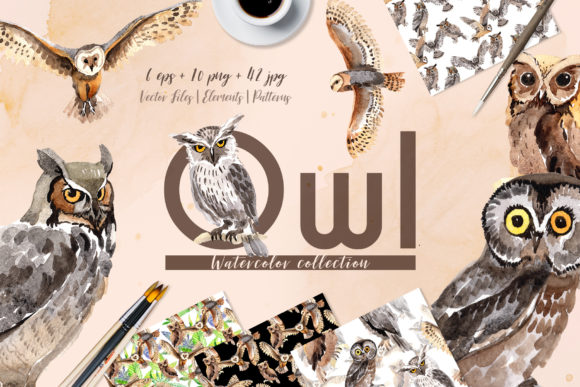
The pack contains 58 separate files: 10 PNG files with transparent backgrounds, 42 JPG files, and 6 EPS files. The PNG files are ideal for layering over other designs because they have no background at all. The JPG files include frames, borders, and patterns at a generous 3500x3500 pixel resolution. The EPS files provide vector scalability for professional design software. This variety means you are not locked into one format or use case. You can grab a PNG owl for a quote graphic, drop a JPG border onto an invitation, or open an EPS file in Adobe Illustrator for complete control over every anchor point.
The Challenges That Owl Watercolor Solves
Anyone who has worked on design projects knows the pain points. You find a beautiful owl illustration online, but the resolution is too low for print. You buy a set of watercolor elements, but they only come in one format, forcing you to convert or rework them. You need a frame that matches the style of your isolated owl, but the two assets come from different artists with different palettes and brushwork. These small frustrations add up to wasted time and compromised results.
Owl Watercolor addresses each of these challenges directly. Because every file in the pack is created by the same artist using the same materials and techniques, the visual consistency is built in from the start. The owls, borders, frames, and patterns share a cohesive watercolor aesthetic. You do not have to spend hours matching color tones or brush textures. Additionally, the 300 dpi resolution and large canvas sizes ensure that whether you print on standard letter paper or enlarge for a poster, the details remain crisp and the watercolor effect stays true.
Another common hurdle is the need for transparent backgrounds. When you place an image on a colored or textured background, a white rectangle ruins the illusion. The 10 PNG files in this pack have no background, so you can place an owl directly onto a patterned card, a wedding envelope, or a blog header without any awkward cropping or masking. This one feature alone can cut your editing time significantly.
Practical Applications Across Different Projects
The real value of any design resource lies in how many ways you can actually use it. Owl Watercolor is versatile enough to serve multiple audiences and applications. Below are several scenarios where this pack shines.
DIY Crafts and Home Decor
If you enjoy making your own greeting cards, scrapbook pages, or wall art, the isolated owl illustrations give you ready-to-use focal points. Print them on cardstock for a birthday card, or use them as part of a larger collage. The JPG frames and borders can be printed as standalone decorative elements or combined with the owls for a complete composition. Because the files are separate, you can mix and match pieces without committing to a single layout. Print one owl on a tote bag using iron-on transfer paper, or use a pattern as a background for a framed quote.
Wedding Invitations and Stationery
Wedding stationery demands elegance and consistency. A watercolor owl motif works beautifully for rustic, woodland, or nature-inspired weddings. Use a border frame from the JPG set as the outer edge of your invitation, then layer a transparent PNG owl in the center or corner. The 3500x3500 pixel resolution means your print will look sharp even on larger invitation sizes. You can also use the patterns for envelope liners, thank-you cards, or program covers. Because the EPS files are fully editable, you can tweak colors to match your wedding palette without losing any of the original watercolor texture.
Greeting Cards for Every Occasion
Whether you need a birthday card, a congratulations card, or a simple note, the owls provide a friendly and artistic focal point. Print a single owl on the front of a folded card, or use a pattern as the entire background. The transparent PNG files let you place text directly over the image without a white box. Combine a quote or a short message with an owl illustration for a card that feels personal and handmade. The 10 PNG files give you variety in owl poses and expressions, so you can choose the one that best fits the sentiment.
Blog Graphics and Social Media
Bloggers and content creators need visuals that stand out in a crowded feed. A watercolor owl can serve as a featured image for a post about nature, wisdom, creativity, or mindfulness. Use the JPG patterns as blog post backgrounds or Pinterest pin templates. Because the files are high resolution, you can scale them down for social media without worrying about pixelation. The transparent PNG files also allow you to create layered graphics, such as an owl perched on a text box or peeking out from behind a quote. Since the EPS files are vector-based, you can resize them infinitely for any platform dimension.
Posters, Prints, and Wall Art
Creating printable wall art is one of the most direct uses for this pack. The frames and borders are already sized at 3500x3500 pixels, which is large enough to print at 11x11 inches at 300 dpi. Add an owl inside a frame, or combine multiple elements for a gallery-style print. The watercolor aesthetic works well in nurseries, classrooms, or cozy living spaces. You can sell your prints on Etsy or give them as gifts. Because the graphics are hand-painted, each print carries an artisanal feel that mass-produced posters lack.
Quote Graphics and Inspirational Content
Quotes about wisdom, learning, and nature pair naturally with owl imagery. Use a transparent PNG owl as a subtle background behind the text, or place it beside the quote for balance. The JPG patterns can serve as textured backgrounds that make the text pop. Because the files are editable in EPS format, you can adjust the color intensity or contrast to ensure your text remains legible. This is especially useful if you plan to print quotes on merchandise like mugs, notebooks, or pillows.
How Different Users Can Approach This Pack
Your skill level and software access will influence how you use Owl Watercolor. Understanding the options helps you get the most out of the files from the start.
If you are a beginner or working with basic software like Microsoft Word or Canva, the PNG and JPG files are your best entry points. The PNG files can be dragged directly into a document or design canvas without any background removal. The JPG frames and patterns work as standalone backgrounds or borders. You do not need advanced editing skills to create professional-looking results. Simply choose your element, place it, and add your text.
If you are an intermediate user with Adobe Photoshop or Affinity Photo, you can take advantage of the 300 dpi resolution and large file sizes to create composite images. Layer multiple PNG owls, blend them with patterns, or apply your own filters. Because the original files are high quality, you can scale them, rotate them, and adjust opacity without degradation.
If you are a professional designer using Adobe Illustrator, CorelDRAW, or Affinity Designer, the EPS files give you full vector control. You can change individual colors, adjust shapes, and scale the artwork to any size without losing resolution. The EPS format preserves the watercolor effect as vector paths, so you maintain the hand-painted look while gaining total editability. This is especially valuable for branding projects, logo concepts, or merchandise that requires color matching to corporate guidelines.
Technical Considerations for Best Results
To get the most out of Owl Watercolor, keep a few practical tips in mind. First, always work in a color space that supports the rich pigment of watercolor. If you are printing, use CMYK mode when possible to ensure the colors translate accurately from screen to paper. The files are provided in RGB, which is fine for digital use, but converting to CMYK before a professional print run helps avoid dull or shifted colors.
Second, because the PNG files have transparent backgrounds, they work best when placed over light or medium-toned backgrounds. Very dark backgrounds may cause the edges of the watercolor to appear harsh if the original artwork was painted on white paper. If you need to place an owl on a dark surface, consider adding a soft drop shadow or adjusting the blend mode in your software to soften the transition.
Third, take advantage of the large JPG size for printing. The 3500x3500 pixel dimension means you can print at up to 11.6 inches without interpolation. For larger prints, the EPS files provide unlimited scalability. Always check your printer's recommended resolution, but 300 dpi is standard for most print applications, and this pack meets that requirement out of the box.
Finally, organize your files before starting a project. With 58 separate files, it helps to create folders by type: PNG owls, JPG frames, JPG borders, JPG patterns, and EPS vectors. This way you can quickly find the element you need without scrolling through a long list. The files are named in a way that reflects their content, but renaming them according to your project can further streamline your workflow.
Recommendations for Getting Started
If you are new to the pack, start with a single project rather than trying to use everything at once. Pick one owl PNG and one border JPG, and build a simple greeting card. This gives you a feel for how the elements combine and how they respond to scaling. Once you are comfortable, experiment with layering multiple PNG owls or combining a pattern background with a frame overlay.
For DIY users, printing a few test pieces on plain paper before committing to cardstock or specialty paper is always a good idea. This lets you check the color saturation and alignment. For digital users, test how the PNG files look against different background colors in your design software. The transparency should remain clean, but subtle halos can sometimes appear depending on how the software handles anti-aliasing. If you notice any edge artifacts, a quick contrast adjustment or feathering can resolve them.
Consider the audience for your project. A whimsical owl illustration works well for children's products, but the same watercolor style can be adapted for sophisticated stationery by choosing a more muted frame or a minimalist border. Because the pack includes multiple frames and patterns, you have options for both playful and elegant aesthetics.
Why Hand-Painted Watercolor Matters for Your Work
In a digital world, hand-painted elements carry a distinct authenticity. Every brushstroke is unique. No two owls in the pack are identical, even if they share the same palette. This organic quality translates into designs that feel personal and intentional. When you use Owl Watercolor in a project, you are not just inserting a generic icon. You are incorporating a piece of art that brings warmth and depth to your work. That matters whether you are creating a wedding invitation that couples will treasure for years, or a blog graphic that invites readers to slow down and engage.
The effort that goes into scanning and optimizing each file at 300 dpi means you are not sacrificing print quality for convenience. You can move between digital and print projects fluidly, using the same set of files for both. The inclusion of EPS files further extends the lifespan of the artwork, allowing you to revisit and repurpose elements years later without worrying about format obsolescence.
Ultimately, the goal of any design resource is to help you create something you are proud of. Owl Watercolor removes technical barriers while adding artistic value. You spend less time troubleshooting files and more time designing. Whether you are crafting a single card or building a full branding suite, the 58 files in this pack give you a solid foundation with room to grow.