The Art of Watercolor Bouquets: A Complete Guide to Sunflowers, Peonies, and Flax Collections for DIY Creativity
Watercolor art has a timeless appeal that captures the delicate beauty of nature in a way few other mediums can match. Among the most beloved subjects for watercolor enthusiasts are floral bouquets, and few combinations are as striking as sunflowers, peonies, and flax. Whether you are a seasoned designer or a DIY beginner, understanding how to work with a watercolor bouquet collection can open up endless creative possibilities. This guide explores everything you need to know about these stunning botanical illustrations, from their artistic significance to practical tips for using them in invitations, decor, and more.
What Is a Watercolor Bouquet Collection?
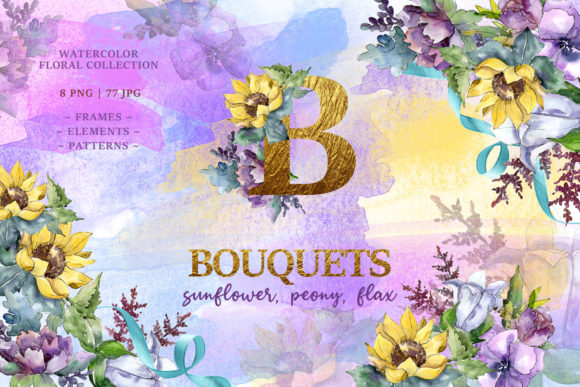
A watercolor bouquet collection is a curated set of digital or printed floral illustrations created using watercolor painting techniques. These collections often include individual flowers, full bouquets, frames, borders, patterns, and isolated elements. The specific collection we are discussing features sunflowers, peonies, and flax, and contains 85 files in total — 8 PNG files and 77 JPG files. Each illustration is hand-painted at 300 dpi, ensuring high resolution and crisp detail. The PNG files have transparent backgrounds, making them easy to layer into any project, while the JPG files include patterns and frames at a generous 3500x3500 pixels.
These collections are designed to be versatile. You can use the isolated elements individually, combine them to create custom bouquets, or apply the patterns and frames as backgrounds or borders. Because every image is a separate file, you have full control over sizing, colors, and placement.
The Unique Charm of Sunflowers, Peonies, and Flax
Each flower in this trio brings its own personality and symbolism. Sunflowers are known for their bold, sunny petals and association with warmth, happiness, and loyalty. Peonies, with their lush, layered petals, symbolize romance, prosperity, and good fortune. Flax, with its delicate blue or white blossoms and slender stems, adds a touch of wild elegance and represents domestic happiness and simplicity.
When combined in a watercolor bouquet, these flowers create a balanced composition that is both vibrant and refined. The contrast between the large, round sunflower heads, the soft fullness of peonies, and the airy stems of flax gives the bouquet visual depth and texture. This makes the collection ideal for a wide range of design applications, from rustic wedding themes to modern minimalist decor.
Why Watercolor Bouquets Are Perfect for Creative Projects
Watercolor illustrations have a soft, organic quality that digital vector graphics often lack. They evoke a sense of handmade artistry, which is especially valuable in an era where authenticity is highly sought after. When you use watercolor bouquet elements, you bring a human touch to your work — even if you are working entirely on a computer.
These elements are particularly well-suited for:
- Wedding invitations and stationery — The romantic feel of peonies and the cheerful brightness of sunflowers make for memorable invitation suites.
- Greeting cards — Whether for birthdays, anniversaries, or thank-you notes, watercolor flowers add warmth and personality.
- Quotes and typography art — Layering a watercolor bouquet behind an inspirational quote creates a visually engaging piece.
- Blog graphics and social media posts — Use a pattern or border to frame your content and make it stand out.
- Posters and wall art — High-resolution files print beautifully for home or office decor.
- DIY crafts and scrapbooking — Print and cut out individual elements for physical projects.
Understanding the File Formats and Their Uses
One common point of confusion for beginners is knowing when to use a PNG versus a JPG. Here is a simple breakdown:
- PNG files (8 files in this collection) — These have transparent backgrounds, so you can place the flower image on any colored background without a white box around it. This is essential for layering elements in digital design. Use PNGs for isolated flowers, bouquets, or any element that needs to blend seamlessly with other graphics.
- JPG files (77 files in this collection) — These have a solid white (or sometimes solid color) background. They are ideal for patterns, frames, and borders where you want the entire sheet to have a unified background. The JPGs in this collection include full-page patterns and frames at 3500x3500 pixels, perfect for printing as scrapbook paper or using as a background in digital projects.
Both formats are 300 dpi, which is the standard for high-quality printing. This means you can use them for professional print projects without worrying about pixelation.
Frames, Borders, Patterns, and Isolated Elements
This collection is organized into several types of content:
- Frames and borders — These are ready-made decorative edges that you can place around text, photos, or other content. They save time and give your project a polished look.
- Patterns — Repeating floral designs that can be used as background paper, fabric designs, or digital wallpaper.
- Isolated elements — Individual flowers, leaves, and stems that you can arrange yourself to create a custom composition. This is where the creative freedom really shines.
Because every illustration is hand-painted, no two elements look exactly alike. This imperfection is part of the charm — it gives your projects an organic, collected-over-time feel.
How to Use the Collection in Your Own Work: A Step-by-Step Approach
If you are new to working with watercolor clipart, here is a straightforward workflow to get started:
- Open your design software — Popular options include Adobe Photoshop, Canva, Procreate, or even Microsoft Word for simple projects.
- Choose a focal element — Start with one of the PNG isolated bouquets or a large flower like a sunflower or peony.
- Layer in additional elements — Add flax stems, smaller blooms, or leaves to build depth. Because the PNGs have no background, you can overlap them freely.
- Select a background or pattern — Use one of the JPG patterns as a full-page background, or place your bouquet on a solid color.
- Add text or other design elements — If you are making an invitation or quote art, position your text carefully around the flowers.
- Adjust size and color — Since the files are high resolution, you can scale them up or down without losing quality. You can also tint or recolor elements in your software to match a specific palette.
- Export and print or share — Save your final design as a high-resolution PNG or PDF for printing, or as a smaller JPG for web use.
Common Misunderstandings About Watercolor Clipart
Many people assume that using pre-made watercolor elements is somehow less creative or limiting. In reality, these collections are tools — like a set of high-quality paints and brushes. The artistry comes from how you combine, arrange, and contextualize them. No two designers will use the same collection exactly the same way.
Another misunderstanding is that watercolor clipart is only for digital projects. Because the files are 300 dpi and large enough for print, they work beautifully for physical crafts, invitations, and decor. You can print them on cardstock, adhesive paper, fabric transfer sheets, and more.
Some also worry that the transparent PNG files might be difficult to use. In practice, they are actually easier than working with traditional clipart because you can drop them directly into any design without needing to erase a background.
Practical Tips for Getting the Most Out of Your Collection
- Organize your files — Before you start, sort the PNGs and JPGs into folders by type (bouquets, isolated flowers, frames, patterns). This saves time when you are searching for a specific element.
- Use a color palette — While the flowers are naturally colored, you can use software tools to shift hues to match your brand or event theme. Yellow sunflowers, pink peonies, and blue flax can be adjusted to pastels or jewel tones with a few clicks.
- Experiment with opacity and blending — In Photoshop or similar programs, lowering the opacity of a watercolor element can create a soft, dreamy effect. Overlapping two elements with a multiply blend mode can produce beautiful secondary colors.
- Combine with other textures — Watercolor elements pair well with linen paper, brush lettering, and gold foil accents for a luxurious feel.
- Don't forget the frames and borders — These are often overlooked but can instantly elevate a simple design. Use a floral border around a quote or a frame around a photo for an elegant finish.
The Modern Relevance of Watercolor Floral Art
In a world where digital design can sometimes feel cold or overly polished, watercolor art brings back the warmth of handmade creativity. It connects us to nature and to the tradition of botanical illustration, which has been cherished for centuries. Today, watercolor bouquets are used in everything from corporate branding to personal passion projects. They are especially popular in the wedding industry, where couples seek unique, organic aesthetics that reflect their personalities.
For bloggers and content creators, watercolor floral elements are a quick way to add visual interest without needing advanced illustration skills. A simple quote over a watercolor bouquet background can become a shareable, Pinterest-worthy graphic. For educators, these images can enhance worksheets, presentations, and classroom decor.
The collection of sunflowers, peonies, and flax is particularly versatile because it spans multiple moods. The sunflowers bring energy, the peonies bring romance, and the flax brings calm. Together, they cover a wide emotional and aesthetic range.
Conclusion: Your Creative Journey Starts Here
Whether you are designing a wedding invitation suite, creating a set of greeting cards, building a blog aesthetic, or simply exploring a new hobby, a watercolor bouquet collection with sunflowers, peonies, and flax offers everything you need to bring your vision to life. With 85 files at your fingertips — including isolated elements, patterns, frames, and borders — you have both flexibility and quality. The hand-painted detail at 300 dpi ensures professional results, while the transparent and solid file formats make the collection beginner-friendly and advanced-user-ready.
Take your time exploring each element. Combine them in unexpected ways. Layer a bold sunflower over a soft peony pattern, or use a flax border to frame your favorite quote. The possibilities truly are endless. And because every image is a separate file, you have full control over size, color, and arrangement. Start with one small project, and you will quickly discover how these watercolor blooms can transform your creative work.