Peony Tenderness Watercolor: A Practical Guide to Its Use and Value
When evaluating digital design resources, the combination of file variety, resolution, and artistic quality often determines whether a collection meets real-world project needs. Peony Tenderness Watercolor refers to a curated set of 53 hand-painted aquarelle graphics centered on peony motifs, designed for applications ranging from wedding invitations to blog visuals. This article examines what the pack offers, where it excels, and what tradeoffs to consider before purchasing or using it.
What Is the Peony Tenderness Watercolor Collection?
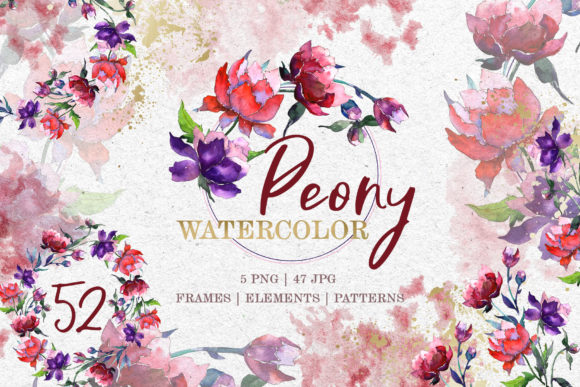
The collection comprises 53 individual files: 5 PNG files and 47 JPG files. The PNG files are clipart images with transparent backgrounds at 300 dpi, suitable for layering on various surfaces without white halos or background interference. The JPG files include frames, borders, patterns, and isolated elements, each sized at 3500x3500 pixels. All illustrations are hand-painted, meaning each image is a separate, unique file rather than a repeated digital effect. The pack emphasizes watercolor aesthetics—soft washes, blended edges, and floral motifs that evoke tenderness, hence the name.
Because every element is an individual file, users can select exactly what they need without manipulating a multi-element composite. The PNG clipart is background-free, while the JPG patterns and frames provide ready-to-use backgrounds or decorative borders. This structure makes the collection flexible for both quick layouts and detailed customization.
Why Someone Might Consider This Pack
Interest in Peony Tenderness Watercolor often stems from a need for floral visuals that feel organic rather than digitally rigid. Hand-painted watercolor files offer subtle color variations, irregular edges, and a tactile quality that vector-based graphics or stock photos may lack. For someone designing a wedding invitation, the soft peony imagery can convey romance or elegance without requiring advanced illustration skills.
Another attraction is the file count and variety. With 47 JPG files dedicated to frames, borders, and patterns, a designer can build consistent branding across multiple pages or products—such as matching a save-the-date card, invitation, and thank-you note—using the same artistic style. The 5 PNG clipart files of isolated flowers or leaves allow for flexible placement on dark or textured backgrounds where a JPG would show a white box.
For users who sell printable products on platforms like Etsy or Creative Market, having a single pack that contains both background elements (patterns, frames) and foreground elements (clipart) can streamline production. Instead of purchasing separate collections for borders and for florals, this pack combines both in one cohesive style.
Benefits and Practical Strengths
High resolution and print readiness. At 300 dpi and 3500x3500 pixels, the JPG files are large enough for standard print projects up to about 11x11 inches at 300 dpi. This makes them suitable for posters, signage, or greeting cards without noticeable pixelation. The PNG clipart at the same resolution integrates cleanly into composites.
Transparent background clipart. The PNG files eliminate the need for manual background removal. For a DIY user creating a quote graphic or blog header, this means placing a peony over a photo or colored background in seconds. The transparency also allows scaling without white edges, which is important when layering multiple elements.
Hand-painted authenticity. Because the images are painted by hand and digitized, each brushstroke is unique. This can add a sense of originality to projects that might otherwise look too uniform or computer-generated. In wedding or greeting card design, where personalization matters, this handcrafted feel is often valued.
All-in-one style consistency. Having frames, borders, patterns, and isolated elements from the same painter ensures that all parts of a project share the same watercolor texture, color palette, and brushwork. This coherence is harder to achieve when mixing resources from different artists or sources.
Tradeoffs and Considerations
Limited customization of the base files. While the pack is described as having editable size and colors, the JPG files are flattened raster images. Adjusting colors in a JPG requires image editing software and can result in quality loss if done extensively. The PNG clipart offers more flexibility for recoloring or layering, but users expecting fully layered PSD files or vector paths may need to adjust their workflow.
File format limitations. All graphics are raster (PNG and JPG), not vector. Scaling a 3500x3500 pixel JPG beyond its original size may introduce softness or pixelation. For large-format printing (e.g., banners over 24 inches), the resolution may not hold up as well as a vector equivalent. Users who need infinite scalability should consider vector floral packs as an alternative.
53 files may include redundancy. With 47 JPG files dedicated to frames, borders, and patterns, some elements may feel visually similar. For a user who only needs one or two frames, the pack may contain more than necessary. Checking the preview images carefully to assess visual diversity is recommended before purchase.
Design style specificity. The watercolor peony style leans toward soft, romantic, and pastel aesthetics. It may not suit minimalist, modern, or bold-themed projects. A graphic designer working on a corporate brochure or an edgy fashion look might find the imagery too delicate.
Situations Where It Is a Strong Fit
Wedding and event stationery. The soft, floral, hand-painted look aligns well with wedding invitations, rehearsal dinner menus, place cards, and thank-you notes. The frames and borders can define text areas without overpowering the message.
DIY greeting cards and gift wrap. For someone creating custom cards for birthdays, anniversaries, or Mother's Day, the isolated peonies and patterns allow for quick assembly. The high-resolution JPG patterns can be printed directly as background paper or card inserts.
Blog and social media visuals. Bloggers in the lifestyle, gardening, or wellness niche can use the PNG clipart to create quote graphics, featured images, or Instagram posts. The transparent background makes it easy to place flowers over photographs or solid colors.
Posters and wall art. The large JPG frames and patterns can be printed as standalone art or incorporated into digital collages. Because each file is separate, a user can create a themed set of prints using the same visual language.
Printable product creation for online shops. Sellers on marketplaces like Etsy can use the frames and borders to design digital templates, invitation suites, or planner stickers. The consistent watercolor style across 53 files allows for product bundles that feel cohesive.
When Alternatives May Be Worth Considering
Vector floral packs. If you need to resize a peony graphic from a business card size to a billboard size, vector formats (SVG, AI, EPS) offer lossless scaling. Vector packs also allow full color editing without quality loss. Users working primarily in design software like Adobe Illustrator may prefer vector files for this reason.
Photographic floral collections. For projects that require realistic detail rather than painted abstraction, high-resolution flower photographs may serve better. Watercolor graphics have a stylized look that may not match the photographic realism needed for certain branding or editorial projects.
Separate element packs. If you only need isolated flowers without frames or patterns, buying a smaller clipart-only set could be more cost-effective. Conversely, if you need a wide variety of frames but few flowers, a frame-specific pack might provide more options.
Budget or trial considerations. Peony Tenderness Watercolor is a specialized product. For a one-time project, a user might find free or lower-cost watercolor floral graphics on sites like Freepik or Unsplash, though these may have less consistency in style or resolution.
Practical Decision-Making Insights
To decide whether this pack aligns with your needs, consider the following factors:
- Project scale. For print projects under 12 inches, the 3500x3500 px JPG files will deliver clean results. For larger prints, test a sample before committing. The PNG clipart, being at the same resolution, has similar size limits.
- Editing comfort. If you are proficient in Adobe Photoshop or similar raster editors, you can adjust colors, combine elements, and create composites effectively. If you rely primarily on vector software, you may find the raster format limiting.
- Style compatibility. Browse the complete preview images to ensure the color palette matches your brand or event. Watercolor tones can vary between monitors, so checking on a calibrated screen helps avoid surprises.
- Quantity versus need. With 53 files, the pack offers variety, but assess how many elements you will actually use. If you need only two or three frames and one pattern, the remaining files become surplus.
- Print vs. digital. For digital use (web, social media), the 300 dpi PNG and JPG files can be downscaled without quality loss. For professional offset printing, confirm with your printer that the file color space (typically sRGB) meets their requirements.
How to Evaluate Fit Against Your Goals
Start by listing the specific visuals you need to create. If your projects require a romantic, organic, hand-painted floral look and you are working with raster-based software, this collection offers a ready-made solution. If you need extreme scalability, full vector control, or a more modern aesthetic, explore other options first.
Test the PNG clipart in your editing environment: place a peony over a dark background and a light background to confirm the transparency works as expected. For the JPG patterns, open one at 100% zoom and examine the edges for sharpness. This quick check can reveal whether the watercolor texture meets your quality expectations.
Consider how much time you want to invest in customization. Because the files are pre-painted and ready to use, they can save hours compared to painting your own watercolor elements or retouching stock photos. However, if you enjoy painting your own digital elements or need total control over color and composition, these files may feel prescriptive rather than freeing.
Final Thoughts on Peony Tenderness Watercolor
This pack occupies a specific niche: high-quality, hand-painted watercolor florals with both foreground clipart and full-coverage backgrounds in a consistent style. It serves best for DIY stationery, wedding materials, greeting cards, and blog visuals where a soft, elegant aesthetic is desired. The 3500x3500 pixel resolution and 300 dpi output support print use for moderate-sized projects, while the transparent PNGs simplify digital layering.
Tradeoffs include the raster-only format, which limits extreme scaling and full color editability compared to vectors, and the specific romantic style that may not suit all design needs. For users who align with its aesthetic and work within its resolution limits, Peony Tenderness Watercolor can reduce design time and provide a cohesive visual language across multiple products or pages. For those needing larger formats, broader style options, or infinite scalability, alternative resources may be a better match. Understanding these parameters help ensure that the collection supports your project rather than constraining it.